Tuesday, March 10, 2009

Microsoft Surface and Dynamics!

Am I dreaming or could in a few years, we could be designing and using Dynamics Applications that worked on Microsoft Surface ?! I have been in love with Microsoft surface ever since I saw the first demo. Apple ofcourse kind of ruined it for Microsoft here too .... but thats another story.

I always thought Surface made sense only in Casino's and five star Hotels ... but this is fantastic!

Read more on Waldo's blog here

 "we got a new demo on the Surface. You know the Surface? It's a multi-finger-touchscreen-coffee table (yes … table (OK, not "coffee" table Smile)) from Microsoft. Now, they are developing a new Warehouse-application on it. It is showing a map of the warehouse (the different zones, bins , locations, …). It is actually an intuitive application where you can move items, create transfers and other warehouse activities by dragging and dropping … . It's linked with dynamics, so it generates the necessary activities for your warehouse employees… . Cool! Next, they showed the integration of it with the Business Process Manager … . The Surface is delivering nice graphical capabilities, where it's gong to be quite intuitive to work with the apps that are run on it."

Wednesday, March 4, 2009

'Feel Good' Tech Support

So often we hear stories of bad tech support, so once in a while when you get good tech support, it might not be a bad idea to mention it.

Greenshades - with their e-Filing center has been popular with Great Plains customers for a while. Last week I got a call from a customer who was on a deadline and getting an error while filing. The customer was frantic and his sense of urgency transferred to me. He said he was trying, but just couldn't get in touch with Support.

I called the Greenshades tech support people. It took me about 30 minutes to wait in queue before I could speak to the tech support guy.

I was ready to blurt out the story with urgency befitting that of a person being rushed to the ER. However, as soon as the person on the other side of the phone said - "Hello there!" (Calm voice, possibly smiling), all I could do was just mention the problem. We got the problem resolved pretty quickly and it was all over.

This has happened to me multiple times over the years, with separate tech support people at Greenshades. Each time I call, and there is an emergency from a customer, and each time I hear a calm voice on the other side, with somebody who is smiling, and get a quick resolution.

Greenshades has the happiest group of Tech Support people I know of.

Thursday, February 26, 2009

AA Table Changes with GP 10 SP2

If you are using GP 10 SP2, FRx Cannot Report on Analytical Accounting History Following an Year End Close.

With Microsoft Dynamics GP 10.0 Service Pack 2 - Microsoft has made some Database changes . When the year end close process is run - it automatically moves the AA transactions from the AAG30000 tables to the AAG40000 series tables.

FRx does not read from the AAG40000 series of tables and therefore, cannot report on historical data for Analytical Accounting. You get the error - "This report yields no data".

There is a hotfix available from Microsoft (hotfix 962862), but you need to contact Microsoft for it, its not available for public download yet.

I have not done any tests yet, but this should lead to performance improvements in your AA Reports. This would also mean that you need to update your custom AA Reports to read data from AAG40000 series tables.

Friday, February 20, 2009

1099 Minimum Amount

As per the IRS, the 1099 form must be issued to Vendors for amounts of $600 or greater. Somebody recently reported that the 1099s were not being produced for Vendors with amounts which were exactly $600.

By default, the minimum amount for 1099’s is set to be $600 (Microsoft Dynamics GP menu >> Tools >> Setup >> Purchasing >> Payables >> 1099 Setup button)

As per the documentation this is the “minimum amount to report on the selected type of 1099 statement.” So my guess was that vendors with amounts exactly $600 and greater would be reported in the 1099 Lists. I checked and in V9, this was the case. However, this seems to have changed in V10. V10 does not pick up Vendors with amounts exactly $600 in the edit list, if the minimum amount is set to be $600.

The solution that I figured out was to set the Minimum amount to be $599.99. This ensured that the vendors with 1099 amount $600 were reported.

Have any of you noticed this change?

clip_image002

Monday, February 16, 2009

Attachment Detector

One of the most embarrassing things in life is forgetting to send an attachment with an email, when you write down the whole 100 words of text describing the attachment. It was most heartening for me to know that a lot of people felt that way, and some came up with a solution.

There’s one solution out there for Outlook, and one for Gmail. The tools – “politely remind you to attach a file if it finds the word "attach" in your email and no actual attached file.”

Outlook Attachment Reminder via Lifehacker

clip_image002

Gmail's Forgotten Attachment Detector

clip_image003

Tuesday, January 27, 2009

Custom Search Engine to Search All Dynamics GP Blogs

Often I like to go back and refer to a blog post I read some time back. Earlier it used to be simple(It used to be Mark Polino or Mariano Gomez), but now with the GP Blog explosion, I have to patiently review the feeds one by one ....

To help myself, and other people like me I have setup a Custom Search Engine which searches all Dynamics GP Blogs. I took the list (about 20 Blogs) compiled by Dave.

You can use the search engine from the top right box on www.jivtesh.com,

or directly from this URL - http://www.google.com/coop/cse?cx=008280271627227523833:qcy2cm12dam

FYI - You can also add it to your Blog/Website by following the instructions here - http://www.gmodules.com/ig/creator?hl=en&url=http%3A%2F%2Fwww.google.com%2Fcoop%2Fapi%2F008280271627227523833%2Fcse%2Fqcy2cm12dam%2Fgadget

Tuesday, January 6, 2009

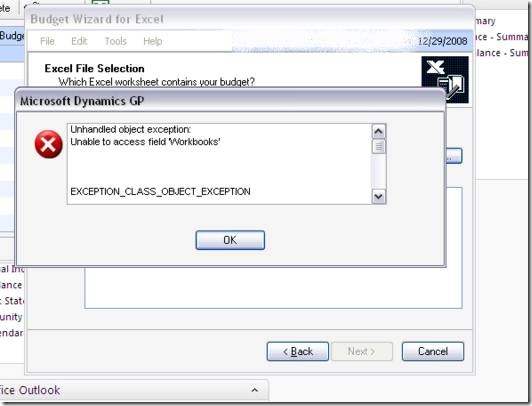
Unhandled Object Exception While Importing a Budget from Excel

While trying to import a budget from Excel in GP 10 we got this error -

Unhandled Object Exception

Unable to access field ‘Workbooks’

Exception Class Object Exception

Followed by the message –

You must have excel installed on this machine in order to run this application.

Excel was definitely installed. The excel sheet was closed. I looked around in newsgroups and knowledgebase but did not find anything useful. Our in house GP expert Rubal told me to look into the task manager to check if there was an instance of Excel in there. Sure it was. I ended that instance and the error went away.

Surprisingly I have seen this error twice in two weeks with two different customers, so I thought of putting it out here in case one of you found it useful.

The original Error

clip_image002

Followed by the message - You must have excel installed on this machine in order to run this application.

clip_image004

End the Extra Excel Process in Task Manager

clip_image006