-->

Thursday, February 26, 2009

AA Table Changes with GP 10 SP2

If you are using GP 10 SP2, FRx Cannot Report on Analytical Accounting History Following an Year End Close.

With Microsoft Dynamics GP 10.0 Service Pack 2 - Microsoft has made some Database changes . When the year end close process is run - it automatically moves the AA transactions from the AAG30000 tables to the AAG40000 series tables.

FRx does not read from the AAG40000 series of tables and therefore, cannot report on historical data for Analytical Accounting. You get the error - "This report yields no data".

There is a hotfix available from Microsoft (hotfix 962862), but you need to contact Microsoft for it, its not available for public download yet.

I have not done any tests yet, but this should lead to performance improvements in your AA Reports. This would also mean that you need to update your custom AA Reports to read data from AAG40000 series tables.

Friday, February 20, 2009

1099 Minimum Amount

As per the IRS, the 1099 form must be issued to Vendors for amounts of $600 or greater. Somebody recently reported that the 1099s were not being produced for Vendors with amounts which were exactly $600.

By default, the minimum amount for 1099’s is set to be $600 (Microsoft Dynamics GP menu >> Tools >> Setup >> Purchasing >> Payables >> 1099 Setup button)

As per the documentation this is the “minimum amount to report on the selected type of 1099 statement.” So my guess was that vendors with amounts exactly $600 and greater would be reported in the 1099 Lists. I checked and in V9, this was the case. However, this seems to have changed in V10. V10 does not pick up Vendors with amounts exactly $600 in the edit list, if the minimum amount is set to be $600.

The solution that I figured out was to set the Minimum amount to be $599.99. This ensured that the vendors with 1099 amount $600 were reported.

Have any of you noticed this change?

clip_image002

Monday, February 16, 2009

Attachment Detector

One of the most embarrassing things in life is forgetting to send an attachment with an email, when you write down the whole 100 words of text describing the attachment. It was most heartening for me to know that a lot of people felt that way, and some came up with a solution.

There’s one solution out there for Outlook, and one for Gmail. The tools – “politely remind you to attach a file if it finds the word "attach" in your email and no actual attached file.”

Outlook Attachment Reminder via Lifehacker

clip_image002

Gmail's Forgotten Attachment Detector

clip_image003

Tuesday, January 27, 2009

Custom Search Engine to Search All Dynamics GP Blogs

Often I like to go back and refer to a blog post I read some time back. Earlier it used to be simple(It used to be Mark Polino or Mariano Gomez), but now with the GP Blog explosion, I have to patiently review the feeds one by one ....

To help myself, and other people like me I have setup a Custom Search Engine which searches all Dynamics GP Blogs. I took the list (about 20 Blogs) compiled by Dave.

You can use the search engine from the top right box on www.jivtesh.com,

or directly from this URL - http://www.google.com/coop/cse?cx=008280271627227523833:qcy2cm12dam

FYI - You can also add it to your Blog/Website by following the instructions here - http://www.gmodules.com/ig/creator?hl=en&url=http%3A%2F%2Fwww.google.com%2Fcoop%2Fapi%2F008280271627227523833%2Fcse%2Fqcy2cm12dam%2Fgadget

Tuesday, January 6, 2009

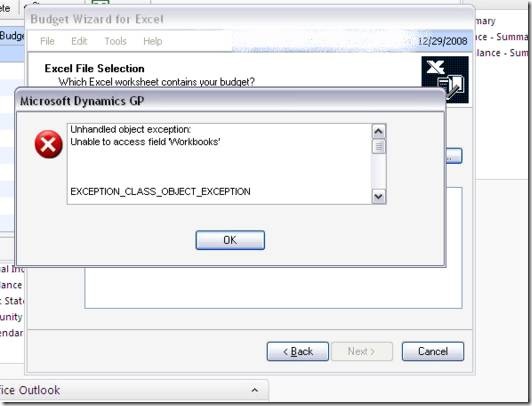
Unhandled Object Exception While Importing a Budget from Excel

While trying to import a budget from Excel in GP 10 we got this error -

Unhandled Object Exception

Unable to access field ‘Workbooks’

Exception Class Object Exception

Followed by the message –

You must have excel installed on this machine in order to run this application.

Excel was definitely installed. The excel sheet was closed. I looked around in newsgroups and knowledgebase but did not find anything useful. Our in house GP expert Rubal told me to look into the task manager to check if there was an instance of Excel in there. Sure it was. I ended that instance and the error went away.

Surprisingly I have seen this error twice in two weeks with two different customers, so I thought of putting it out here in case one of you found it useful.

The original Error

clip_image002

Followed by the message - You must have excel installed on this machine in order to run this application.

clip_image004

End the Extra Excel Process in Task Manager

clip_image006

Tuesday, December 9, 2008

Small Business Financials to Dynamics GP Migration

There used to be a Migration Tools option in Downloads, but I couldn't find it today. I spend 15 minutes searching for these, you shouldn't have to. These should come in handy in light of people moving away from SBF to Dynamics GP as no new product releases are planned for it.

Small Business Financials 8.0 to Great Plains 8.0 Migration Tool Information

https://mbs.microsoft.com/partnersource/downloads/migrationtools/sbf80togp80.htm?printpage=false

Small Business Financials 9.0 to Microsoft Dynamics GP 9.0 Migration Tool Information

https://mbs.microsoft.com/partnersource/downloads/migrationtools/sbf90togp90.htm?printpage=false

Monday, December 1, 2008

Automatically Print all GP Reports to Screen - Excellent Tip

Excellent tip from Mariano Gomez and Frank Hamelly -

How to automatically send all posting reports to screen in Microsoft Dynamics GP

This is something that has pained me for a long time! Mariano has given the following script on his blog which forces all reports to screen.

UPDATE SY02200 SET ASECTMNT = 0, PRTOPRNT = 0, PRTOSCNT = 1, PRTOFLNT = 0
    
GO